The clients database can be exported to a plain text or tab-separated file that can be imported into spreadsheets. The email fields have been extended to 64 characters. Improvements have been made to the invoice template and an Email invoice feature has been added.
Sirius includes powerful and easy-to-use business management software! With the Business Manager, you can schedule appointments, browse through your appointment schedule to see what upcoming appointments you have, quickly read in the names of people whose data is in Sirius or enter names of new people, and maintain information about these clients, such as postal address, email address, phone numbers, and notes. You can even print envelopes directly from Sirius manager to the printer.
There are fields for you to enter credit card information, print receipts, and print envelopes. There is even a timer that you can use to time appointments or other work activities, which is particularly useful when charges are being paid on an hourly rate rather than a flat rate.
Even though we designed Business Manager with the professional astrologer in mind, if you are not a professional astrologer, but a professional in some other field, you may wish to use the Business Manager feature of Sirius for your other professional activities. You can also use Business Manager for managing personal appointments and other activities as well.
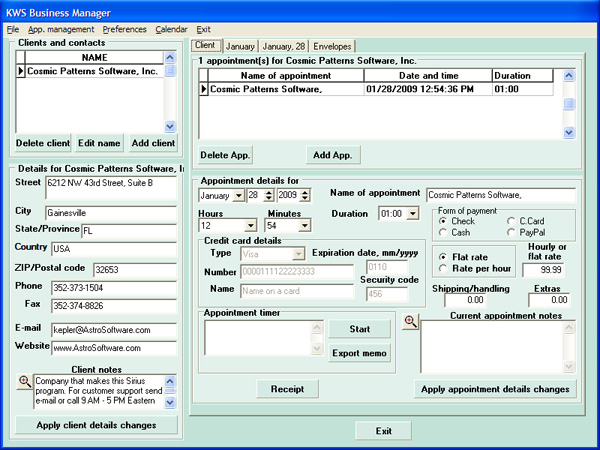
The Business Manager has an unlimited client notes, and current appointment notes area.
Within the Business Manager's prefences, you can include the consultant's name, put your company name, set the currency to use, and set the % of taxes to collect. These information will later be on the generated receipt. Generated receipts can either be saved to file or printed.
The clients database can be exported to a plain text or tab-separated file that can be imported into spreadsheets. The email fields have been extended to 64 characters. Improvements have been made to the invoice template and an Email invoice feature has been added.